Odoo MCP
One Setup for Every Client, One Kill Switch
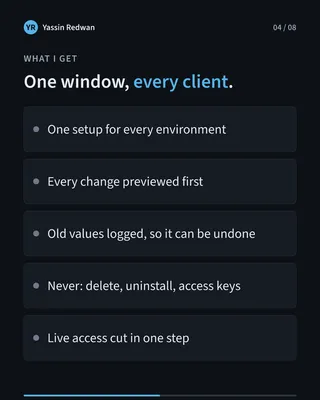
One setup covers every client and environment, instead of one per database.
I work on Odoo, the ERP system, for more than one client, and I use AI agents to do part of that work. Letting an agent touch a business system is only worth it if you can say exactly what it may and may not do.
So I built my own Odoo MCP server. It is one door between my agents and every client’s Odoo, with the rules and the key on my side. The result: one setup covers every client and every environment, and a live system is never changed without a human seeing the change first.
The problem
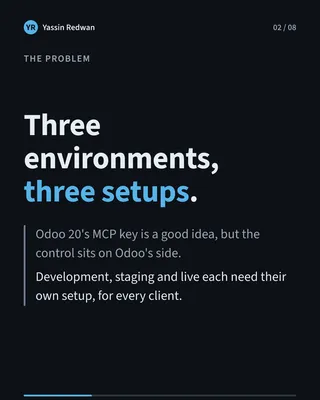
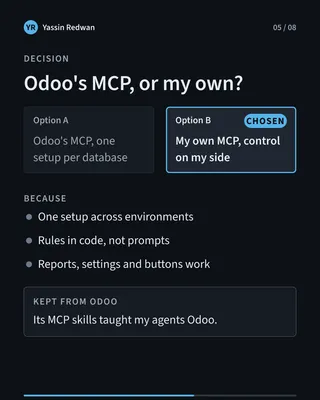
Odoo 20 lets you create an access key for AI agents through MCP. The idea is sound. But the control sits on Odoo’s side, and the tools are still limited.
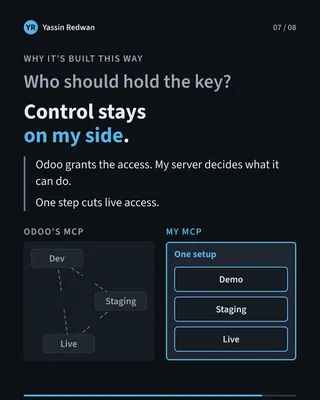
In practice, every database became its own setup. Development, staging and live meant three configurations per client. With several clients, that is a lot of separate settings to keep right, and any one of them can be wrong.
The tools also fell short on real work. Reports failed. There was nothing for settings, modules or workflow buttons. Most databases exposed read-only tools. So I ended up with two channels into the same system, each with its own rules, and no single place that showed what had been done.
That is the part that worried me. Two channels with two sets of rules means that when something goes wrong, nobody can say which rule applied.
Constraints
- Live data is not forgiving. A wrong change on a live system hits real orders, invoices and customers.
- The agent is fast, but it is not the one accountable. I needed the rules to hold even when the agent makes a mistake.
- Several clients, several environments. The same safety had to apply everywhere, without me rebuilding it for each database.
- Different Odoo versions. The control had to work whatever version a client runs.
- Odoo’s own tools were not enough. I could not wait for them to grow into what I needed.
What I built
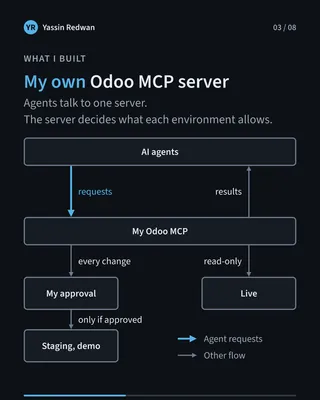
One server that all my agents talk to, for all my clients’ databases. I switch between databases from one window, and the same rules and the same log apply to all of them.
The flow, from the agent’s request to the change:
- The agent asks for something, for example “read these records” or “change this field”.
- The server checks the request against the rules of the environment it is pointed at.
- For a change, the server does not run it. It shows me a preview with the values before and after.
- I approve. Only then does the change run, exactly as previewed.
- The change is written to a log, together with the old values.
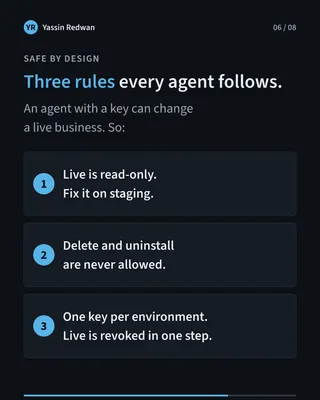
Each environment has its own rules. Demo is free. Staging asks first. Live is read-only. Each environment also has its own key, and the live key is short-lived. If I revoke it, access is cut in one step.
Key decisions
1. Build my own server instead of relying on Odoo’s. The alternative was to wait for Odoo’s MCP to cover reports, settings, modules and workflow buttons. I did not want to run two channels in the meantime. I moved the control to my side, so I decide the rules, and they stay the same whatever Odoo ships next.
2. Rules live in the server, not in prompts. The alternative was to tell the agent in its instructions to be careful. An instruction can be ignored or misread. A rule enforced by the server cannot. My agents also got up to speed on Odoo faster using the MCP skills Odoo 20 provides, but the rules stay in my server.
3. Live is read-only. I investigate on live, and I reproduce and fix on staging. The alternative was to allow careful changes on live. I preferred a system where the worst the agent can do on live is read. The short-lived key adds a second safety: when the work is done, I revoke it.
4. Every change is previewed, approved and checked again. The alternative was to let the agent apply changes directly. Instead, I see before and after, and nothing runs until I approve. A preview is good for ten minutes and for one use. If the record changed in the meantime, the change stops, so I never overwrite something I have not seen. The agent cannot approve its own change.
5. Some actions are never allowed, anywhere. Deleting, uninstalling and touching access keys are blocked in every environment, including demo. The alternative was to rely on asking. I chose a list that does not bend, because these are the actions you cannot take back or that undo the other controls. For everything else, the log keeps the old values, so a change can be undone.
6. One key per environment, limited to one database. A key for staging cannot be used on live, even by mistake. There is also a cap on how many records a single change can touch, and a kill switch per environment.
7. Keep the control layer independent of the Odoo version. The same rules apply to every version. Older versions take some trial and error to read and write, but the rules do not change.
Outcome
- One setup for every client and environment, instead of one per database.
- Faster moves between a client’s databases, in development and in bug fixing. I have no measured number for this, so I will not invent one.
- Go-live checks on live ran through it. The checks for Price Watcher, my price monitoring system, after each release on live went through the server: 61 logged calls between 27 and 31 October 2026, all reads, no changes.
- Changes on staging stayed controlled. 14 changes were applied on staging after I confirmed them, each with its old values logged.
The log counts are calls through my toolkit, which includes a command-line fallback behind the same rules, so they are not calls from the MCP alone.
What I’d do next
The server is in daily use by my own agents. The next step on my list is hardening it further.
Takeaway
Give an agent one door with clear rules, and keep the key on your side.