Price Watcher (Beta)
Because a Wrong Price Is Worse Than No Price
Nobody checks product pages by hand: the team is notified in Teams when something important happens.
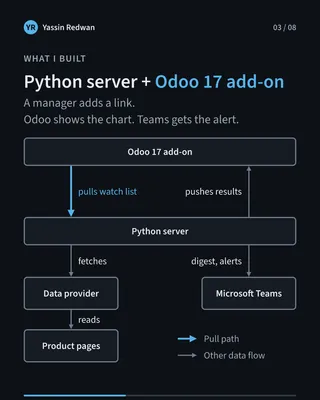
I built Price Watcher for a company whose purchasing team buys goods for resale. It is a price-monitoring system: a Python server plus a custom Odoo 17 add-on. Nobody checks product pages by hand anymore. A manager adds a link to the list, and the team is notified in Microsoft Teams when something important happens.
It is running in production, and it was built around one rule: a wrong price in the ERP is worse than a missing one.
The problem
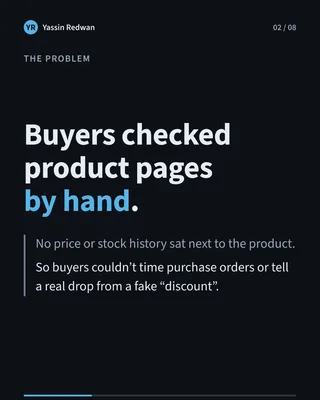
I noticed that buyers were checking product links themselves. Next to each product in Odoo there was no price history and no stock history, so there was nothing to show whether a price had really dropped, or whether a “discount” was just a crossed-out price that had been there for weeks.
Nobody asked me to fix this. I saw it, and I thought it was a good use of a system. The hours buyers spent checking pages, and the drops they might have missed, are not something I measured, so I will not put a number on them. What I can say is that people were making purchase decisions on whatever they happened to see that day.
Constraints
Three things shaped the design.
- People act on what the ERP shows. If Odoo shows a price, a buyer will trust it. A guess that looks like a fact is the most dangerous output the system could produce.
- No official feed. There is no API from the shops being watched, so the prices have to be read from ordinary product pages, and pages change without warning.
- A live ERP and a small team. The Odoo add-on and the server are deployed at different times, and anything I add to Odoo has to survive future Odoo updates.
What I built
Two parts and one contract between them.
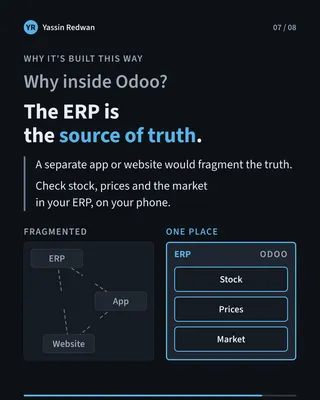
The Odoo add-on is where the team works. Each watched product gets a price tab with a price and stock chart, and buy signals written in plain words with a “Why” line, so a buyer sees the reason and not just a verdict. Managers add links, set alerts and set tracking end dates. The cost of tracking is shown before they save. Odoo only displays; it adds its own tables and never changes Odoo’s native ones.
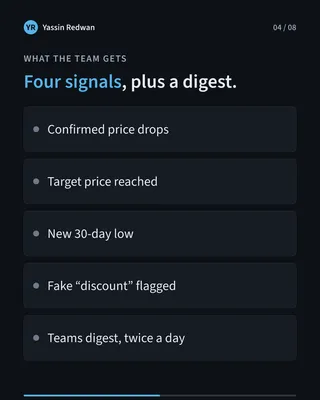
The Python server does the reading and the thinking. It pulls the watch list from Odoo, checks the pages, keeps the price history, works out the signals and pushes the results back. It also posts a price digest in Teams twice a day. The signals cover a confirmed price drop, a target price reached, a new 30-day low and a fake “discount”.
The contract is the agreed set of messages between the two, written as JSON. The add-on owns it, and the server only uses a feature once Odoo says it supports it.
Key decisions
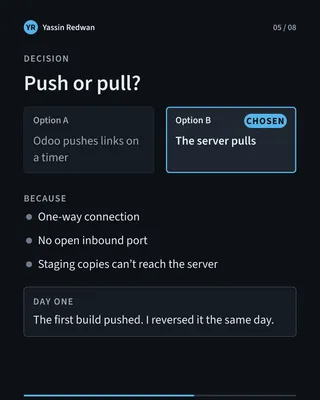
1. The server pulls; Odoo never calls out. On day one I built it the other way: Odoo pushed links to the server on a timer. That same night I reversed it. With pull-only, Odoo holds no address or key for the server, there is one connection direction to secure, and test copies of Odoo cannot reach the server by accident. I changed my mind fast, and the design is simpler for it.
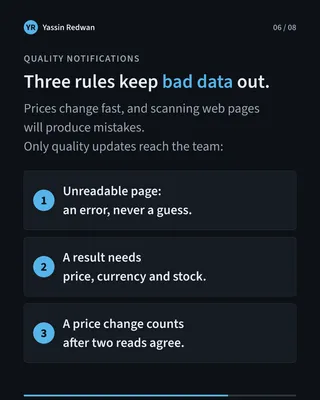
2. Unreadable pages become errors, never guesses. This is the “a wrong price is worse than no price” rule in practice. If a page cannot be read cleanly, the result is an error and the ERP shows nothing new. The alternative was to fill the gap with the last known or best-guess value, which looks better on a dashboard and is much worse in a purchase order.
3. A price change counts only after a second read agrees. One bad read should never raise an alert. Waiting for a second matching read costs a little time, but it stops a misread from sending a buyer after a drop that never happened. This is also why I replaced the early idea of alerting on a single check.
4. The contract only adds, never changes. The contract went through 9 versions in 11 days. Because each version only adds to the last, an older server keeps working against a newer add-on, and the two sides can be deployed on different days. The alternative was to change things in place and coordinate every release, which is slow and fragile.
5. The cost brake lives on the server. Every check has a price, and how often a link is checked is what drives the bill. Managers can see the cost in Odoo, but the daily cap is a server-only setting: a money brake no Odoo value can raise.
Outcome
The result is the change in how the team works. Buyers no longer open product pages to check them. They add a link to the list and get notified in Teams when something important happens. They also see the history and the reason behind each signal inside Odoo, next to the product.
For the go-live I carried the full price history over, so the charts were useful from the first day. I rehearsed it first on a copy of production: 541 results accepted, 0 refused. The real switch followed the same steps.
I do not have a measured figure for hours saved or money saved, and I would rather say so than invent one.
I designed the architecture, the contract and the rules. AI agents built it, working through a shared hand-over queue, and I made the decisions and approved the pushes.
What I’d do next
The backlog is short and practical. I want to move the price history to a larger database, add automatic checks that guard the house rules as the code grows, and keep a second data source ready as a backup.
Takeaway
A system that feeds an ERP must be allowed to say “I don’t know”, because people act on what the ERP shows.